CCTV · VMS · PHYSICAL-SECURITY HEALTH
AlarmForgeX CCTV and VMS health monitoring software.
AlarmForgeX continuously supervises cameras, NVRs, VMS recording servers, UPS and supporting security devices from one local Windows platform—so silent faults are found before somebody discovers missing footage or an unhealthy security system. It is especially useful where CCTV must keep operating on an offline or restricted network without making camera health depend on a vendor cloud.
Windows installer notice: the current Windows release is not yet digitally code-signed. Review the download notice before installing.
Offline CCTV local health monitoringMulti-system CCTV · VMS · UPS30-day full evaluation
 AlarmForgeX
 SYSTEM HEALTHY
Site 1 · LiveOPERATIONAL PICTURESite Overview
!
HEALTH EVENT · CAMERA 014North Gate Camera · OfflineLast healthy 42 seconds ago · fault history retained
ATTENTIONDEVICEMETHODSTATE
XProtect Recording ServerAPI GATEWAYONLINE
Hikvision North GateISAPIONLINE
Dahua RecorderRECORDER APIONLINE
PowerShield UPSNETGUARDONLINE
RECEIVER PATHSIA DC-09 Primary ACK
CAMERA HEALTHOfflineFault qualified · 42s
One platform across your security estate
MILESTONE XPROTECTHIKVISIONDAHUAPOWERSHIELDONVIFGENERIC IP
LOCAL-FIRST · RESTRICTED-NETWORK READY
Monitor the CCTV environment without making it depend on an AlarmForgeX cloud service.
AlarmForgeX runs on a Windows host inside the security environment. This is a strong fit for isolated and restricted CCTV estates where cameras or NVRs should not require direct internet access. Camera and recorder credentials, health checks and operational history can remain local, while only the reporting paths you deliberately configure communicate outward.
Local health engineWorks from inside the CCTV / security network.No cloud dependencyCore monitoring does not require an AlarmForgeX cloud connection.Controlled egressUse approved receiver, email or other reporting paths only where the site permits them.
BUILT FOR PROFESSIONAL SECURITY OPERATIONS
One health layer for the teams responsible when CCTV fails.
AlarmForgeX is aimed at organisations that need proactive evidence that cameras, recorders, VMS servers and supporting infrastructure are actually healthy—not another video-viewing platform.
Turn reactive call-outs into proactive service.
Supervise customer CCTV estates, retain fault history and arrive with evidence instead of discovering the problem on site.
For security integrators →Receive technical CCTV faults through familiar paths.
Route qualified health faults and restores to configured receivers using SIA DC-09 or CSV/IP/T4000 where the monitoring environment supports them.
For monitoring centres & ARCs →See silent failures across distributed sites.
Bring cameras, NVRs, VMS servers and UPS devices into one operational health history across retail, logistics, campuses and other commercial estates.
For multi-site estates →Keep core health monitoring inside the security environment.
Use a local Windows host for environments where internet dependency, inbound access or vendor-cloud reliance is undesirable.
For restricted networks →HEALTH FIRST
Monitor. Diagnose. Report.
AlarmForgeX is built first to answer the operational question that matters: is the security system healthy right now, and what changed when it was not?
Continuously watch the estate
Supervise cameras, NVRs, VMS recording servers, UPS, network equipment and generic IP devices across one or more sites.
- Online, stale, recording and offline states
- Power, service and connectivity checks
- Mixed-vendor monitoring from one Windows host
Turn silent faults into useful history
Keep persistent health state, outage history and commissioning evidence so technicians can see what failed, when it changed and whether it recovered.
- Alarm and restore transitions
- Reliability and downtime history
- PDF / CSV handover and service evidence
Send qualified faults where they matter
Optionally route technical faults and restores to professional receivers with acknowledgement, retry and failover visibility.
- SIA DC-09 and CSV/IP / T4000
- Primary / secondary receiver paths
- Heartbeats, Area / Zone mapping and audit trail
HOW HEALTH MONITORING FITS
A monitoring layer beside the systems you already run.
AlarmForgeX does not replace the VMS or recorder. It watches the surrounding security estate from a local Windows host, records health transitions and can optionally forward qualified faults to a monitoring receiver.
Connect the estate
Bring cameras, recorders, XProtect, UPS and other IP devices into one local workspace.
Watch health continuously
Check availability, recording state, power and selected technical conditions through each configured integration or protocol.
Act on qualified faults
Use local history, service evidence and optional acknowledged receiver reporting when the site requires it.
PRODUCT IN ACTION
See the working picture, not just the promise.
Representative AlarmForgeX views show how the health workspace prioritises faults and keeps a mixed CCTV estate visible in one operational view.
See what needs attention first.
Surface confirmed infrastructure faults by priority while healthy monitoring, reporting and receiver delivery continue in the background.
See the monitored estate in one view.
Bring VMS servers, recorders, cameras, UPS and generic endpoints into one structured site view with current state and last-check evidence.
Representative application views using demonstration data. Available integrations and displayed fields depend on the site configuration.
In development · Future product direction
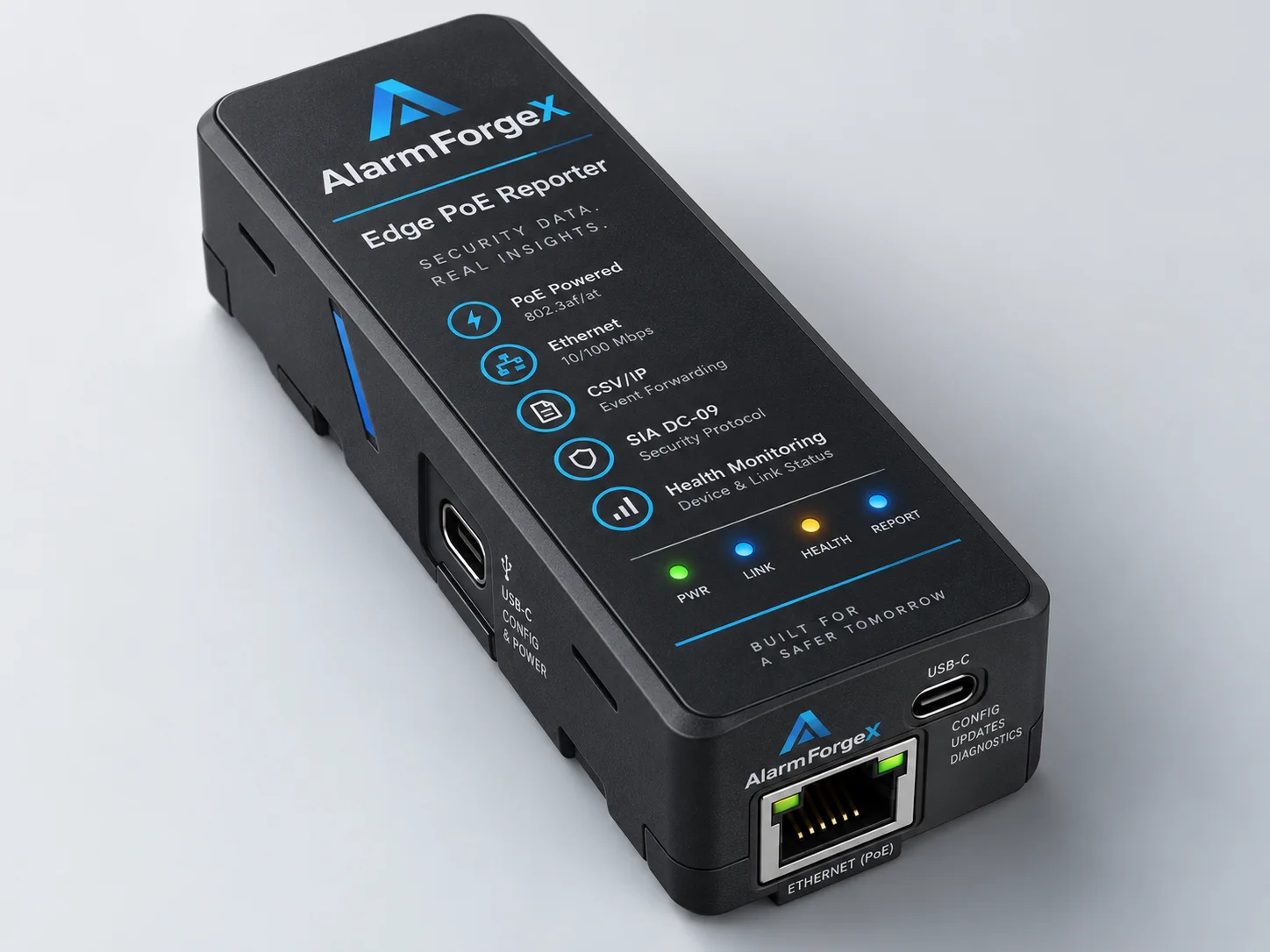
Concept render only — final product design, specifications and release details may change before production.
PRODUCT DIRECTION · DEDICATED PLATFORM
Local-first healthFocused supervision of supported security-system and infrastructure health.
Always-on deploymentDesigned around a dedicated monitoring role rather than a general-purpose operator workstation.
Receiver reportingProfessional fault, restore and supervision reporting remains part of the product direction.
Focused scopeHealth monitoring and reporting first, without positioning the platform as a video workstation.
A dedicated AlarmForgeX platform is in development.
AlarmForgeX is developing a dedicated, always-on deployment platform focused on local security-system health monitoring and professional receiver reporting.
This platform is intended to become the primary AlarmForgeX deployment option once development, security testing and field validation are complete. The current Windows edition remains available while that work continues.
Development preview only. Final hardware, specifications, supported integrations, capacity, licensing, pricing and release timing are not yet commitments.
BUILT FOR SERVICE TEAMS
Designed for the person who gets called when the footage is missing.
AlarmForgeX reduces the time spent jumping between recorder interfaces, camera tools, ping utilities and UPS portals. It creates one health history that an installer, service technician or security manager can understand.
Multi-siteSeparate equipment and receiver accounts without losing the estate-wide view.Service ModeTest devices and reporting without releasing test traffic as live alarms.CommissioningDiscover, map, test, document and hand over with structured evidence.Local controlOperational data stays with the Windows host unless you configure delivery.
See every supported setup path →SUPPORTED SYSTEMS
A practical bridge across mixed security estates.
Choose a direct product integration or use standards-based and generic monitoring for other IP equipment. Support level is shown clearly so installers know what to expect.
PRIMARY
VMS · CAMERAS · HEALTHMilestone XProtect
Discover recording servers and cameras through the API Gateway and supervise supported health states. Large-estate development testing has exercised simulated XProtect estates up to 1,000 cameras.
Explore XProtect monitoring →SUPPORTED HEALTH
HEALTH · CAMERA · NVR · STORAGEHikvision Camera / NVR
Supported health monitoring for compatible Hikvision cameras and recorders, including recorder, camera and storage states where the device and firmware expose them.
SUPPORTED HEALTH
HEALTH · CAMERA · NVRDahua Camera / NVR
Supported health monitoring for compatible Dahua cameras and recorders, with device and recorder depth dependent on model, firmware and configured integration.
GENERIC
DISCOVERY · HEALTHONVIF Profile T / M
Standards-based discovery and monitoring where model and firmware behaviour can vary.
PREVIEW
CAMERAS · DEVICESAxis VAPIX Cameras
Bulk-connect Axis cameras and devices with native VAPIX health monitoring.
SUPPORTED
UPS · POWER HEALTHPowerShield NetGuard
Discover and supervise UPS devices from one or more NetGuard servers on the network.
SUPPORTED
UPS · LOCAL STATUSEaton UPS Companion
Test and import an Eaton USB UPS through the read-only status feed from UPS Companion.
DISCOVERY
LAN · SUBNET SCANNetwork Discovery
Scan a local subnet, review discovered addresses, then add the equipment that matters.
GENERIC
PING · RTSP · SNMP · MQTTManual IP Devices
Add Ping, TCP, HTTP/S, RTSP, snapshot, SNMP or MQTT monitoring without a product promise.
Primary Main product focusSupported Supported integrationPreview Pilot use; compatibility may varyGeneric Installer-configured protocol monitoring
01FIELD STATEHealth fault or restore
02QUALIFIEDSite, identity and route
03DELIVEREDReceiver acknowledged
PROFESSIONAL RECEIVERA60 / Z014
CAMERA OFFLINE · NORTH GATE
CSV/IPSIA DC-09LOCAL T4000 PATH
ACK · 2026-08-29 18:42:16INCLUDED RECEIVER REPORTING
Turn health faults into acknowledged receiver events.
When a maintenance contract or monitoring workflow requires it, AlarmForgeX can turn qualified device-health faults and restores into receiver traffic while keeping queue, failover, retry and acknowledgement evidence visible. Live interoperability testing has exercised SIA DC-09 and CSV/IP receiver paths against commercial receiver infrastructure.
- Persistent delivery queue with controlled retries
- Per-account heartbeat grouping
- Standard functional Area / Zone allocation
- Email and local operator notification options
- Secure Offline Monitoring Mode with an approved local T4000 or gateway target
HEALTH-FIRST LICENSING
Pay for the monitoring capacity you actually need.
AlarmForgeX licensing is intentionally focused on device and system health. Choose the permanent Health capacity that matches the site or estate.
No expiry
Prove the health-monitoring workflow on a small site before buying permanent capacity.
- Health monitoring
- 10 points
- Local history
- Included
- Windows host
- Local-first
30 days
Activate the built-in evaluation to test the wider estate, reporting paths and health workflow before purchase.
- Health capacity
- Expanded
- Receiver reporting
- Included for test
- Health workflow
- Full evaluation
From NZ$299 one time
Choose a one-time Health licence sized for the number of supported devices you need to supervise. Receiver reporting is included where configured.
- Health Starter
- 20 Health devices
- Health Professional
- 50 Health devices
- Health Business
- 100 Health devices
- Receiver reporting
- Included
Your one-off permanent licence does not include unlimited ongoing support. Reasonable getting-started support is included for 30 days from permanent licence issuance/assignment, not the purchase date. You can always report genuine AlarmForgeX licensing issues and reproducible product defects. Support Policy · Assisted/priority support available separately.
Health monitoring covers supported cameras, recorders, VMS services, UPS devices and other infrastructure endpoints that AlarmForgeX supervises. SIA DC-09 and CSV/IP/T4000 receiver reporting remain part of the health-monitoring capability where configured.
COMMON QUESTIONS
Know what you are installing.
AlarmForgeX is a health and reporting layer beside existing CCTV, VMS and physical-security systems. It does not replace your VMS, recorder or monitoring receiver.
Does AlarmForgeX move my security data to the cloud?
No. Monitoring and operational history run on the local Windows host. External reporting, email and MQTT occur only when configured.
Does AlarmForgeX replace my VMS or NVR?
No. Your VMS/NVR records and manages video. AlarmForgeX watches system health, keeps operational history and can optionally report qualified faults and restores.
Can I use equipment not listed above?
Often, yes. Generic Ping, TCP, HTTP/S, RTSP, snapshot, SNMP and MQTT methods cover many IP devices, but do not imply product-specific compatibility.
What happens after a Windows restart?
AlarmForgeX is designed to recover its local monitoring services and continue health supervision after the Windows host restarts.
Why may Windows show a blue install warning?
AlarmForgeX is currently distributed by a new independent publisher. Windows SmartScreen may show a warning until code signing is introduced and reputation builds.
Does my permanent licence include lifetime technical support?
No. Your one-off permanent licence does not include unlimited ongoing support. Reasonable getting-started support is included for 30 days from permanent licence issuance/assignment, not the purchase date. You can always report genuine AlarmForgeX licensing issues and reproducible product defects, including after the 30-day period. See the Support Policy.
When does my included support start if I buy now and assign later?
The 30 days start when your permanent licence is first issued/assigned to its computer. Buying unassigned licence stock does not start that period. Evaluation activation is separate.
What help is included, and can I arrange more?
Reasonable getting-started support covers licence activation, basic AlarmForgeX setup guidance and initial AlarmForgeX-specific questions. Ongoing network, VMS, camera, Windows or third-party hardware/software troubleshooting; network design; monitoring-centre configuration; remote PC work; training; custom integration work; site administration; and general consultancy are not included in the one-off licence. Assisted/priority support is available separately by contacting support, subject to availability and an agreed scope and fee.
Can I report a licensing issue or software defect after 30 days?
Yes. You can always report genuine AlarmForgeX licensing issues, including licence delivery and activation problems, and reproducible product defects. You do not need a paid support package to report them. Applicable consumer rights and remedies remain unaffected.
WINDOWS INSTALLER READY
Bring the whole security estate into view.
Download the current AlarmForgeX Windows installer or browse stable, pre-release and older versions in the downloads catalogue.